
Turning Attendees Into Promoters: How FramedIn Transforms Event Marketing with Social Proof
FramedIn simplifies event marketing by turning one flyer into many personalized versions your attendees can create themselves. With easy link sharing and built-in customization, it helps you save time, increase engagement, and expand your reach organically.
Introduction
Event promotion can often feel overwhelming. With so many strategies available, choosing the right way to reach and engage your audience is not always straightforward. However, one approach consistently stands out above the rest: social proof.
Social proof goes beyond traditional marketing. It builds connection, fosters trust, and most importantly, brings people together. When your attendees become part of your promotion, when their faces are featured on your event materials it creates a powerful sense of belonging and authenticity. Suddenly, your guests are not just attendees. They become advocates who naturally share and promote your event within their own circles.
This kind of organic promotion is incredibly valuable. It allows people to show support for your event while also expanding its reach. More importantly, it builds trust something no amount of paid advertising can fully replicate.
This is exactly where FramedIn comes in.
FramedIn bridges the gap between your event and your audience by making it effortless for attendees to personalize and share event flyers. In this detailed guide, we will walk you through how to get the most out of FramedIn, showing you how to design reusable flyers in seconds and scale your event promotion like never before.
Get started with FramedIn here:
Create a Free FramedIn Account
What is FramedIn?
FramedIn is a simple and powerful design tool that allows you to create reusable “I am attending” flyers with ease. It works seamlessly with your existing designs, so you do not have to start from scratch if you already have something prepared.
At its core, FramedIn lets you add placeholders to your designs. These placeholders act as customizable areas where your audience can insert their own details, such as their photo, name, or other relevant information. Once your design is ready, you generate a single link that you can share with your audience. Anyone who accesses the link can personalize the flyer and instantly download their own version.
FramedIn goes beyond just personalization. It also provides a wide range of tools that allow you to design different types of flyers from scratch. You can explore creative layouts, customize elements, and even generate designs using AI to speed up your workflow.
In short, FramedIn transforms a single design into a scalable, personalized experience for every attendee.
Start designing your first reusable flyer:
Sign Up on FramedIn
How FramedIn Works
Getting started with FramedIn is simple and straightforward. Follow these steps to create and share your first personalized flyer experience.
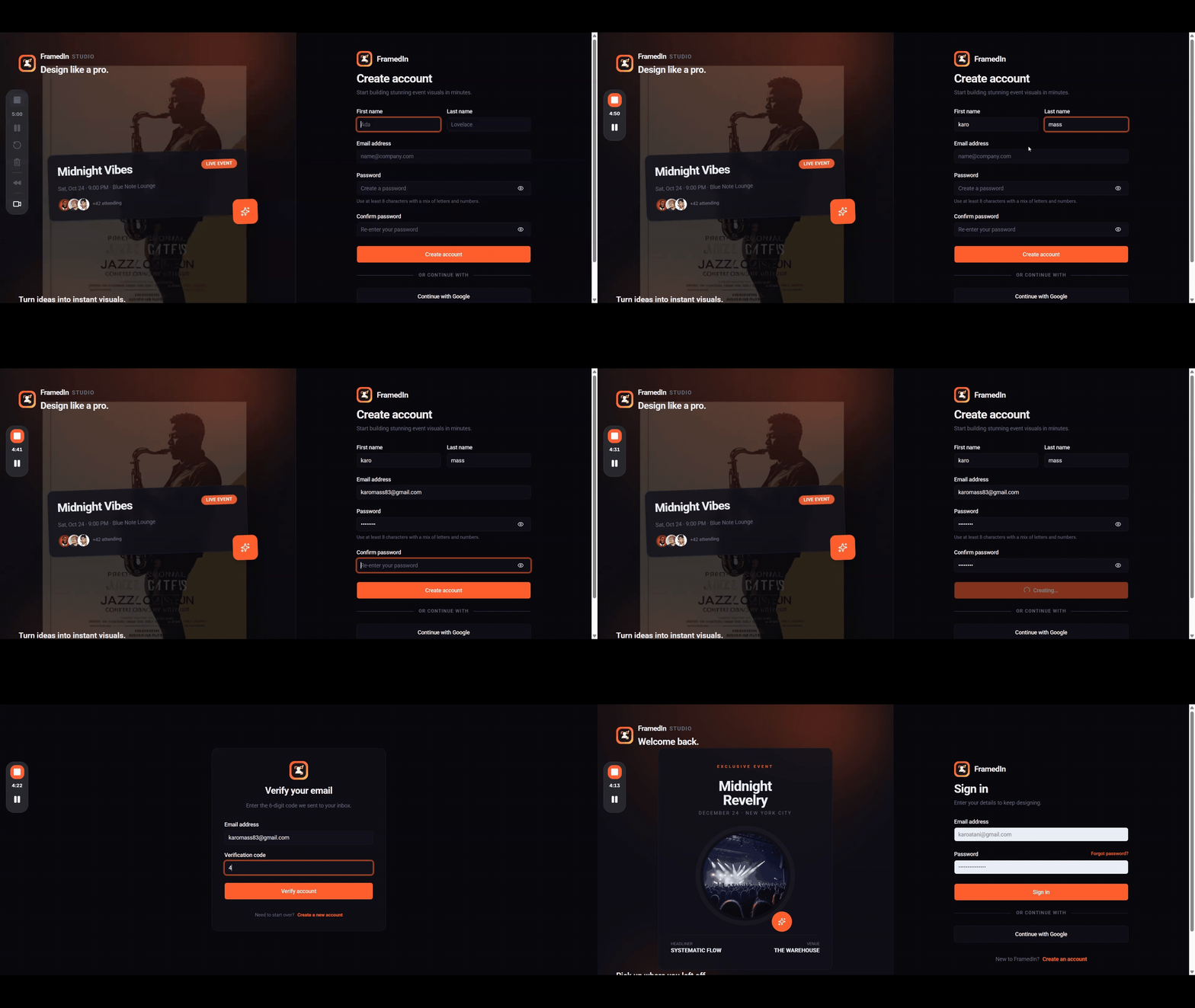
1. Create an Account
To begin, you need to register for an account on FramedIn.
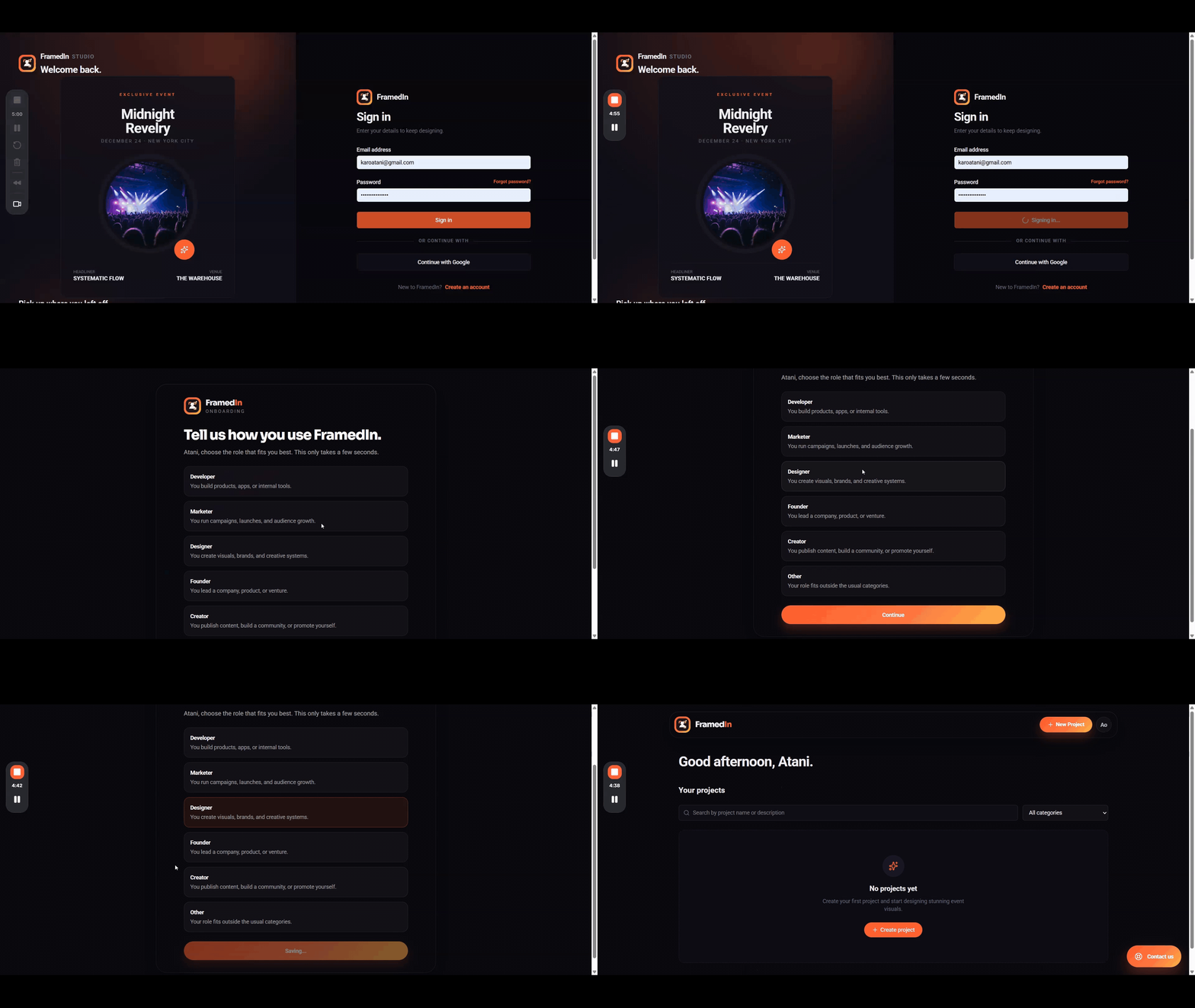
2. Sign In
After creating your account, sign in to access your dashboard.
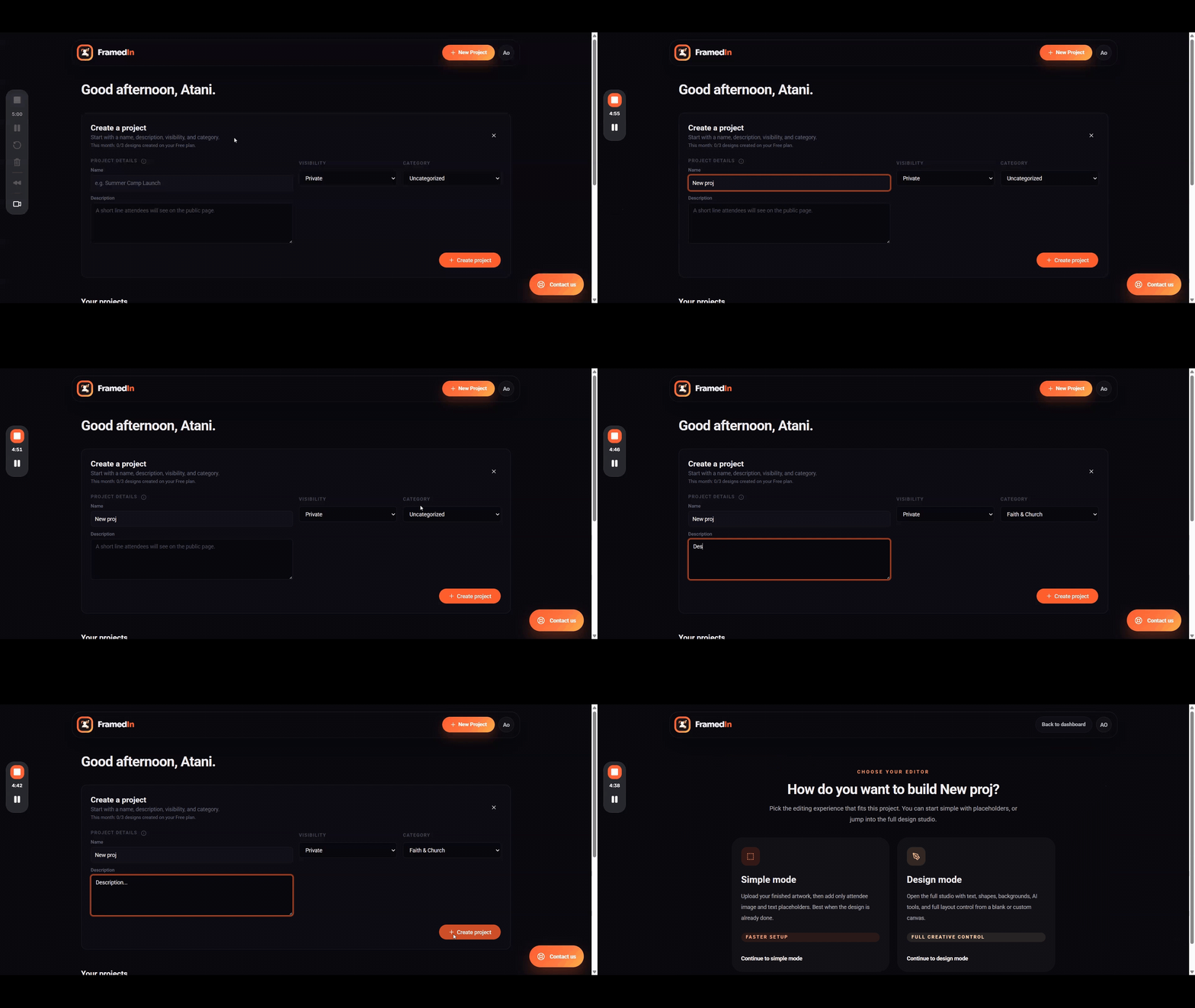
3. Create a New Project
Once you are logged in, create a new project by entering the required details such as:
- Project name
- Description
- Visibility
- Category
For private events, your project will only be accessible through a shared link. Public events, on the other hand, can appear on the FramedIn events page for wider visibility.
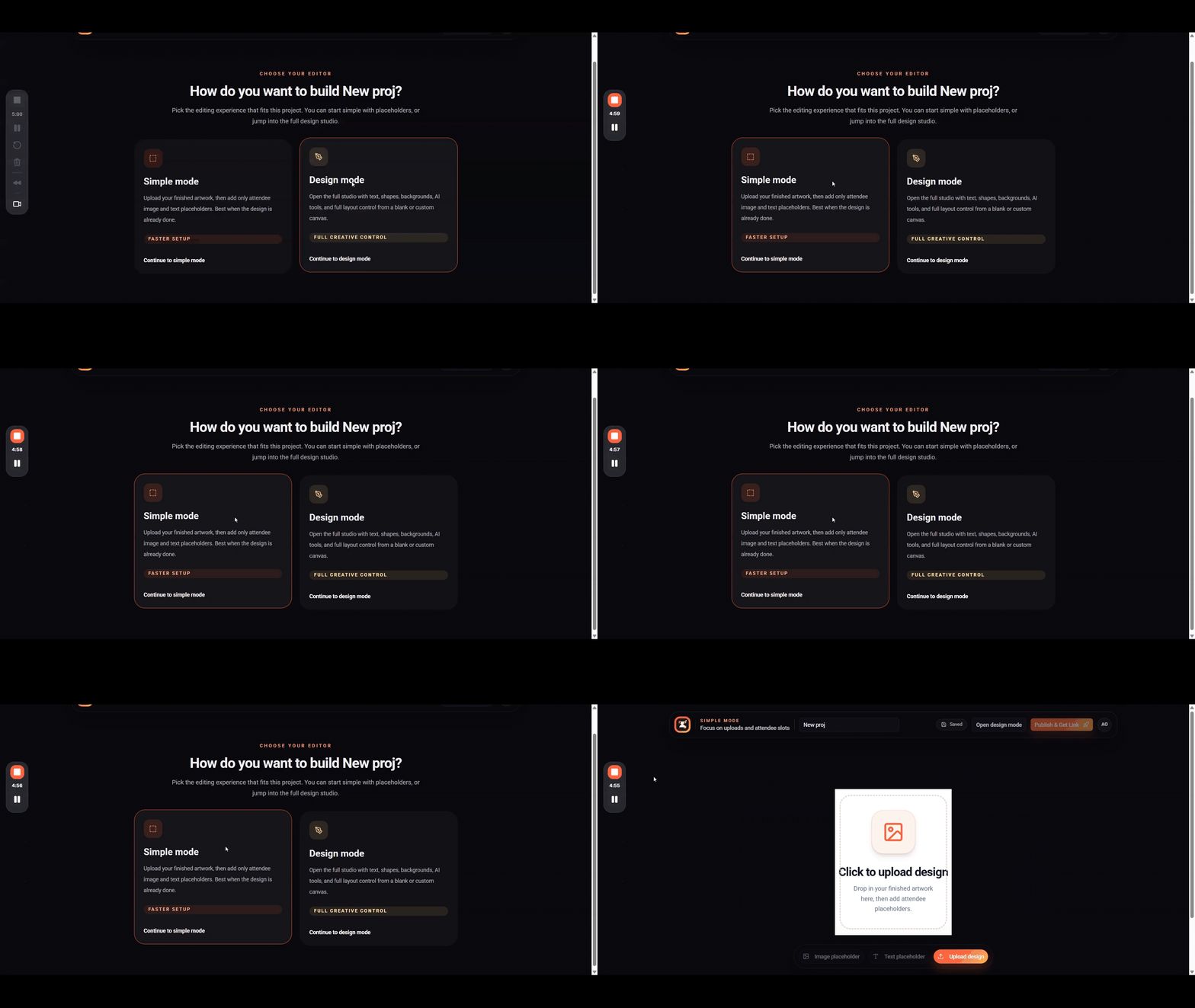
4. Choose Your Mode
After creating your project, you will be prompted to choose between:
- Simple Mode
- Design Mode
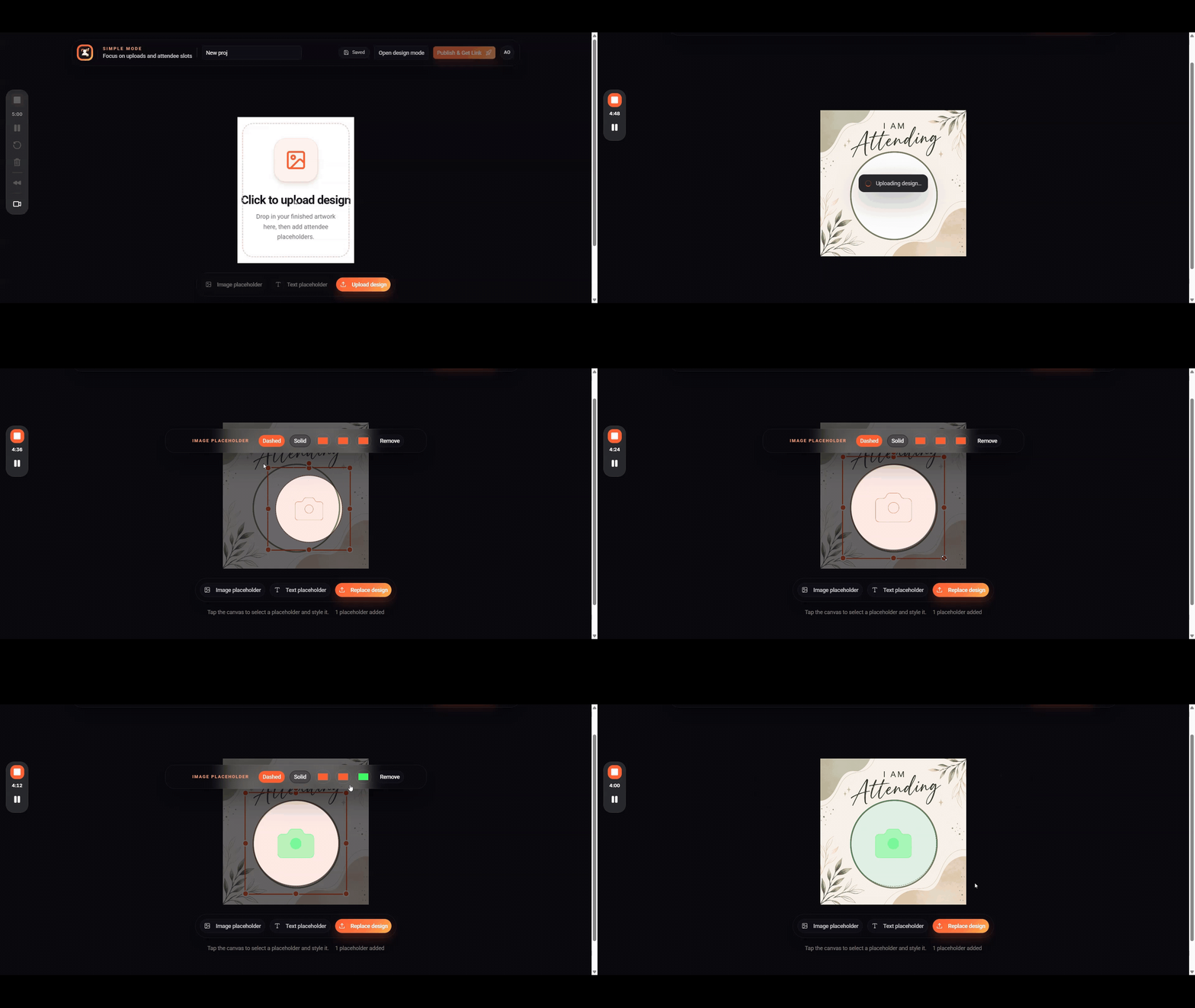
If you already have a design, Simple Mode is the best option because it helps you get started quickly. Design Mode is ideal if you want to build your flyer from scratch using FramedIn’s tools.
5. Add Placeholders and Design
Next, design your flyer and add placeholders for elements like photos, names, or other details your audience can personalize.
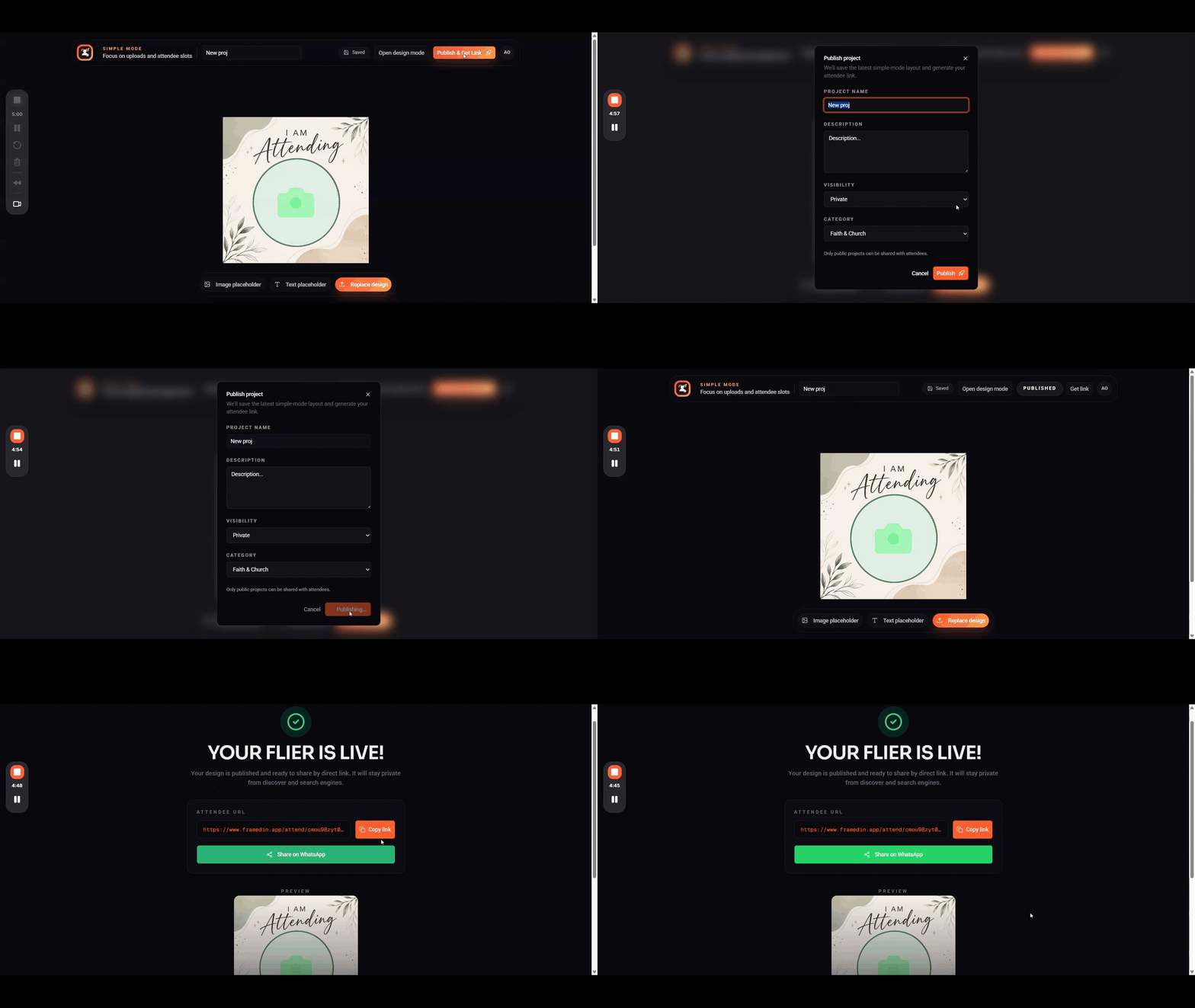
6. Publish and Share
Once your design is ready, publish your project to generate a unique link. Share this link with your audience so they can personalize and download their own flyers.
Ready to publish your first personalized event flyer?
Access Your FramedIn Dashboard
Core Features of FramedIn
FramedIn combines an online design studio, dynamic placeholders, public attendee pages, link-based sharing, and download-ready output into one smooth workflow. The goal is simple: design once, publish once, and let every attendee create their own version.
Design Once, Scale Infinitely
Traditional event promotion often starts with one base flyer. Then the repetitive work begins: duplicate the design, insert another person's photo, update the name, export the image, rename the file, and repeat the process for every attendee.
FramedIn removes that bottleneck by letting you create one reusable design. Inside the FramedIn Studio, you can add text, images, shapes, backgrounds, templates, and dynamic placeholder nodes. These placeholders mark areas attendees can personalize while keeping the rest of the design consistent.
Examples of use:
- Conference attendee cards
- Wedding guest invitations
- Birthday and party flyers
- Church event announcements
- School event promos
- Brand ambassador campaigns
- Concert and nightlife flyers
- Speaker announcement designs
The organizer designs once. The audience personalizes it themselves.
Start Creating Reusable Flyers with FramedIn
Personalized Attendee Experience
Attendees can personalize flyers directly from their browser.
They do not need:
- A design tool
- An account
- Help from the organizer
They simply:
- Open the event link
- Upload a photo
- Enter their name
- Download the flyer
FramedIn is mobile-first, making it ideal for WhatsApp, Instagram, and social sharing.
Simple Link-Based Sharing
Every project generates a shareable link.
You can distribute it via:
- WhatsApp groups
- Instagram stories
- X (Twitter) posts
- Facebook communities
- LinkedIn posts
- Email newsletters
- Campus chats
- Church groups
- QR codes
One link replaces hundreds of manual design requests.
Instant Flyer Generation and Download
After personalization, attendees download a PNG flyer instantly.
This enables:
- Easy social sharing
- Fast event promotion
- User-generated marketing content
Every attendee becomes part of the promotion campaign.
Mobile-Friendly Experience
FramedIn is optimized for mobile users:
- Upload photos from phone
- Quick text input
- Instant preview
- One-tap download
- Direct sharing to social apps
Key Benefits
Saves Time and Effort
Instead of manually designing each flyer, you:
- Design once
- Add placeholders
- Publish
- Share link
No repeated edits or exports.
Boosts Engagement
People are more likely to share content that includes them.
Benefits include:
- Higher social proof
- Organic reach
- Word-of-mouth promotion
- Increased visibility
Creates a Sense of Ownership
Attendees feel represented when they see:
- Their name
- Their photo
This increases emotional connection and participation.
Eliminates Repetitive Design Work
No more:
- Duplicate files
- Manual edits
- Re-exporting designs
- Repeated messaging
Everything becomes automated through attendee self-service.
Create Your First Automated Flyer Project
Use Cases
Events and Conferences
- “I am attending” flyers
- Speaker cards
- Panelist announcements
- Volunteer graphics
- Sponsor posts
Weddings and Parties
- Guest invitation flyers
- Birthday cards
- Bridal party graphics
- Anniversary posts
School and Campus Events
- Club promos
- Student elections
- Graduation events
- Freshers week posters
Brand Campaigns
- Ambassador flyers
- Product launches
- Community challenges
- Influencer campaigns
FramedIn vs Traditional Workflow
Manual Workflow
- Design flyer
- Collect attendee info
- Edit each version manually
- Export repeatedly
- Send individually
Slow and repetitive.
FramedIn Workflow
- Create design
- Add placeholders
- Publish
- Share link
- Attendees personalize
Fast and scalable.
Comparison
| Area | Traditional | FramedIn |
|---|---|---|
| Personalization | Manual | Attendee-driven |
| Time | High | Low |
| Scaling | Difficult | Easy |
| Sharing | Individual files | One link |
| Engagement | Low | High |
Why FramedIn Stands Out
Simplicity
- Design once
- Share once
- Let users personalize
Scalability
Works for:
- Small events
- Large campaigns
- Global audiences
Accessibility
- No design skills required
- No account needed for attendees
- Mobile-first experience
Get Started with FramedIn Today
Getting Started
Create Your First Design
- Add event details
- Insert placeholders
- Lock key information
Share Your Link
Distribute via:
- QR codes
Best Practices
- Keep placeholders visible
- Use simple text
- Ensure mobile readability
- Encourage sharing
Future of Personalized Content
Trends include:
- User-generated content
- Mobile-first creation
- AI-assisted design
- Community-driven marketing
- Shareable templates
FramedIn fits directly into this future.
Conclusion
FramedIn solves a major problem in event promotion: how to create personalized, shareable flyers without repetitive manual design work.
With FramedIn:
- One design becomes many
- Attendees become promoters
- Events gain organic reach
- Organizers save time
It transforms static designs into living, shareable experiences across entire communities.
Ready to scale your event promotion?
Create Your Free FramedIn Account Now
Tags
Comments
0 comments from the FramedIn community.
Sign in to join the conversation and leave a comment on this post.
No comments yet. Be the first to respond.